ClassWatcher Review: Missing-Work Tracking, Marks, and Parent Texting Inside Brightspace
Every Brightspace teacher knows the ritual: open an assignment, count the submissions, cross-reference the classlist, figure out who's missing, then go find a phone number. ClassWatcher is a Chrome extension built by an Ontario elementary teacher to collapse that ritual into one screen: scan the page, see who hasn't submitted — with their marks right beside — and text or email a parent in one tap.
What it does
The scan
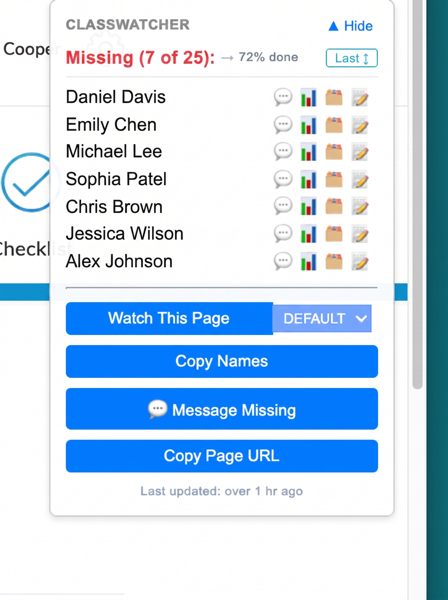
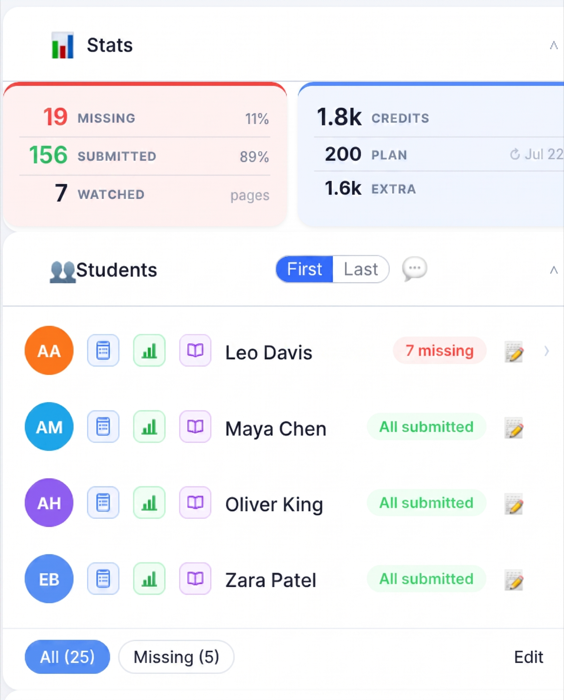
Open any Brightspace assignment or quiz page and ClassWatcher's side panel shows which students on your class list haven't submitted. You can "watch" a set of pages — this week's assignments, say — and scan them all at once, so the Monday-morning question ("who's behind?") takes seconds instead of a period. Missing-work summaries can also appear directly on the Brightspace page beside student names.
The message
Beside each missing student: one tap to text or email their parent (or the student). Messages are teacher-written or template-started — nothing sends without you. Every contact is logged automatically, which turns out to be the sleeper feature: at parent-teacher interviews, "here's every time we reached out" is a powerful page to have open.
Marks and reports
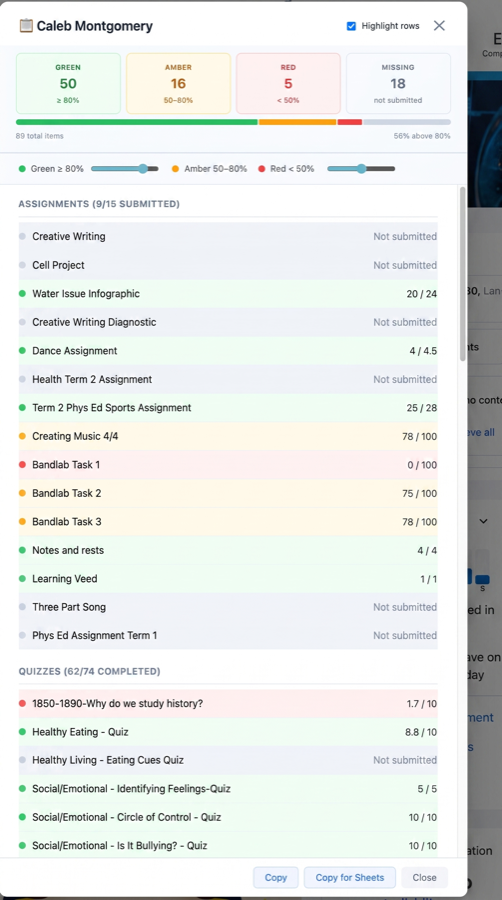
This is the half of ClassWatcher that turns it from a nag-tracker into a marks tool. It reads quiz scores and assignment grades through Brightspace's own API and shows them alongside submission status, so "who's missing work" and "how are they doing" are the same screen. One click opens a per-student mark history, and a parent-report view — every assignment and quiz, colour-coded — is built for interview night: the answer to "how is my kid doing?" is already open in front of you. Class lists, missing-item reports, marks, and contact history all export to Google Sheets or CSV.
Privacy posture
Class lists and watch lists live in your browser's storage, not on ClassWatcher's servers; grades and submission data are read live from Brightspace on your device. What the service does store — messaging logs and contact notes — is auto-deleted after 365 days, in line with PIPEDA. The full policy is at classwatcher.com/privacy.
Pricing
Free for everyone through October 1, 2026. After that (prices in CAD):
| Plan | Price | Includes |
|---|---|---|
| Basic | $8/month | 1 class, 5 watched pages, 50 message credits/month |
| Pro | $19/month | Unlimited classes and pages, 200 credits/month |
| School | $129/month | 10 teacher seats, 500 pooled credits/month |
A text message costs 1 credit; an email costs 0.2. If you stop paying, scanning and messaging pause but your data isn't deleted — classes and history are intact if you come back.
The honest limitations
- Chrome on a computer only. No Safari, no Firefox, and no iPad or phone — Chrome on iOS can't run extensions at all, and there's no ETA for mobile.
- D2L Brightspace only. If your school uses Google Classroom, Canvas, or Moodle, this tool does nothing for you — by design, it reads Brightspace pages.
- SMS is North America only. International accounts can email parents but not text them.
- It's new. A small install base and no Chrome Web Store ratings yet (as of July 2026). You'd be an early adopter.
- Some school boards block extension installs on managed devices; you may need IT to allowlist it.
Verdict
If you teach with Brightspace in Chrome and contacting families about missing work is part of your week, ClassWatcher is currently the only tool that does this job — nothing else on the Chrome Web Store combines missing-work tracking with parent messaging, and D2L's own closest feature solves a different problem. It's free until October 1, 2026, so the honest pitch is: try it on one class and judge for yourself.